Plan your film from the script.

Storyboard, shot list, breakdown, camera setups and a pitch deck, all read from your screenplay. For features, shorts, commercials and series.

How it works No subscription. 50 free credits to start, no card.

A workflow, not an AI film generator

SPACEODD is a pre-production workflow: breakdowns, 3D framing, camera setups and a shooting order, worked out from your script. Generating pictures is optional. You can build a project by hand, frame every shot in 3D, plan the setups and upload your own images without generating anything.

Who it's for

Feature films

Read in parts of up to 35 pages, then broken down and planned shot by shot.

Short films

A board for your DP, a shot list for the AD, a deck for the festival.

Commercials

Your product, from its real photos, in every frame. A deck for the client.

Series and creators

Episodes and web scripts, even ones not yet in screenplay format.

What's in a project

Every tool works from the same read of your script. Shown here: The liminalist, a short planned in SPACEODD.

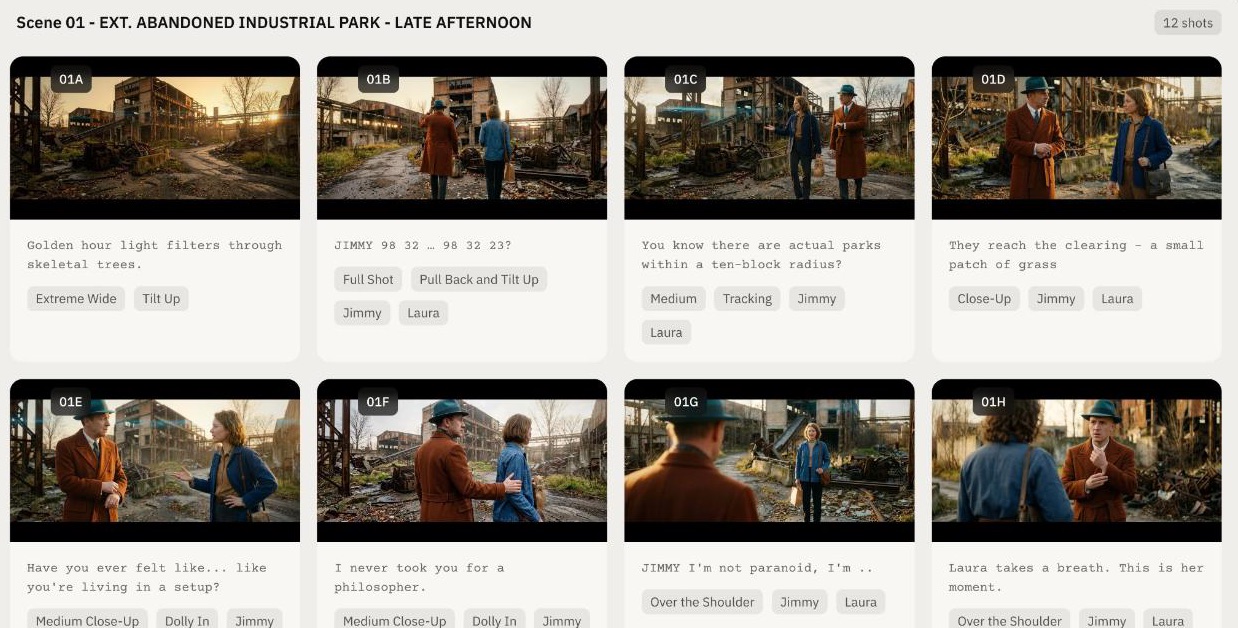
The storyboard of The liminalist: twelve frames of two people in an abandoned industrial park at golden hour

Storyboard

A frame for every shot, in eight styles. Export a PDF with the script beside each frame.

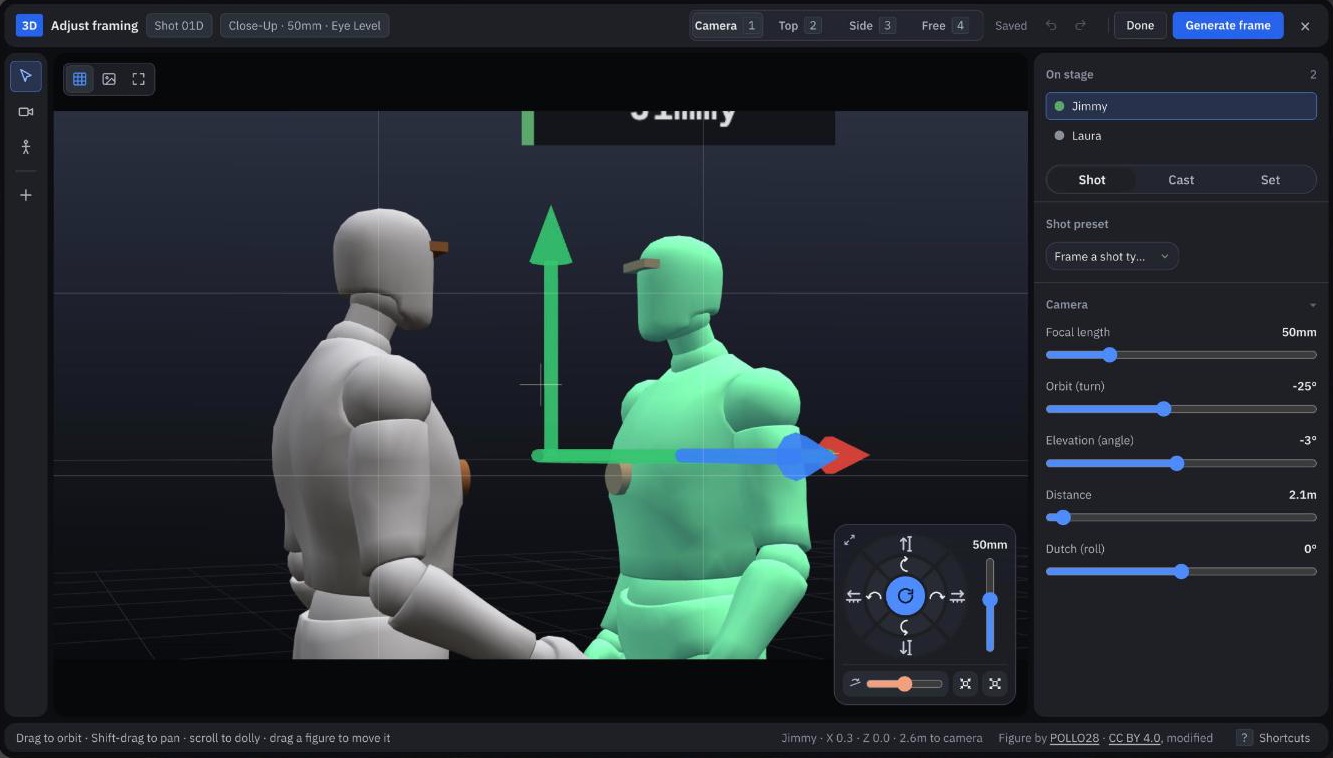
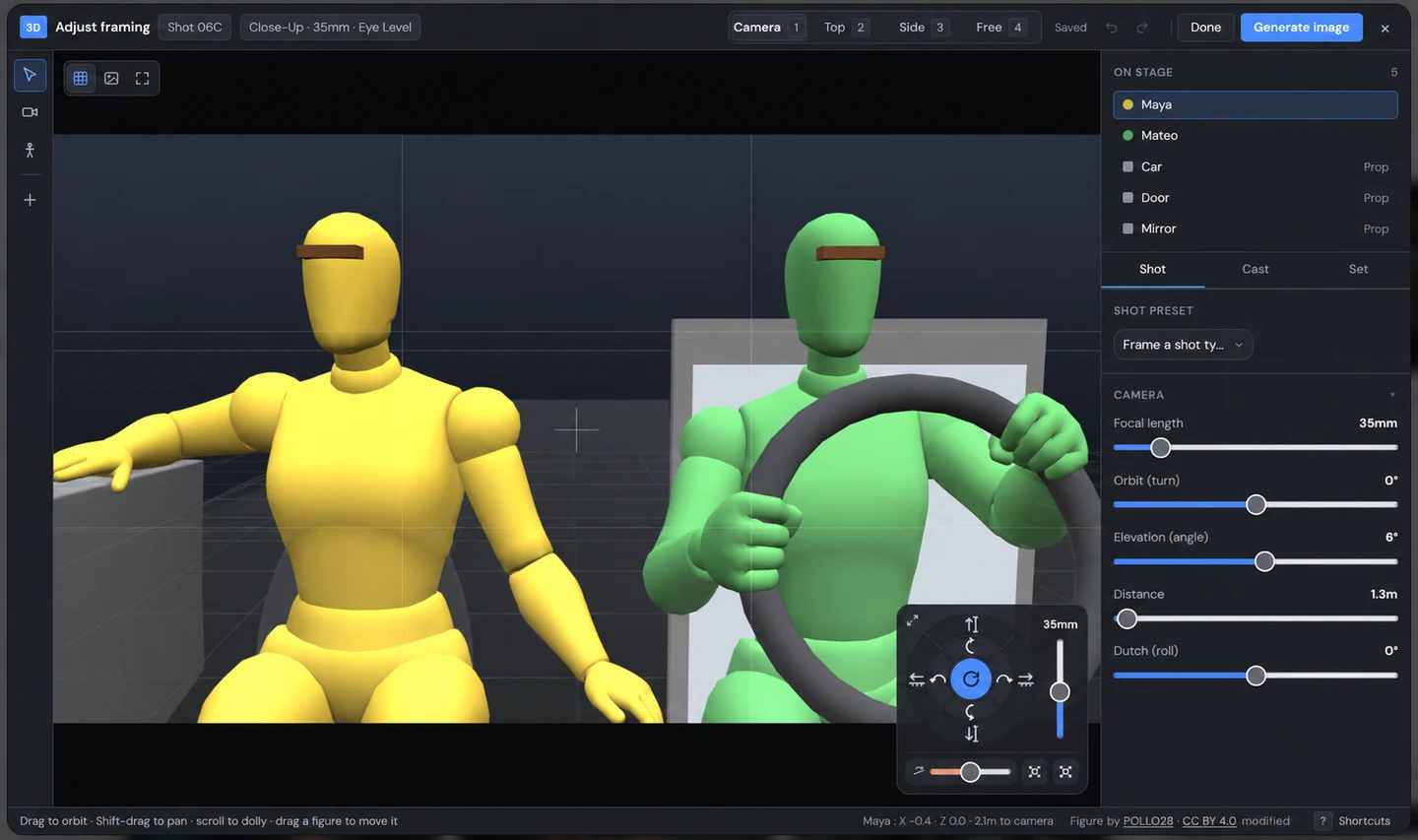
The 3D framing editor: two figures, the camera dial and the lens settings for a close-up

3D framing

Camera, lens and cast set before anything is drawn. Free.

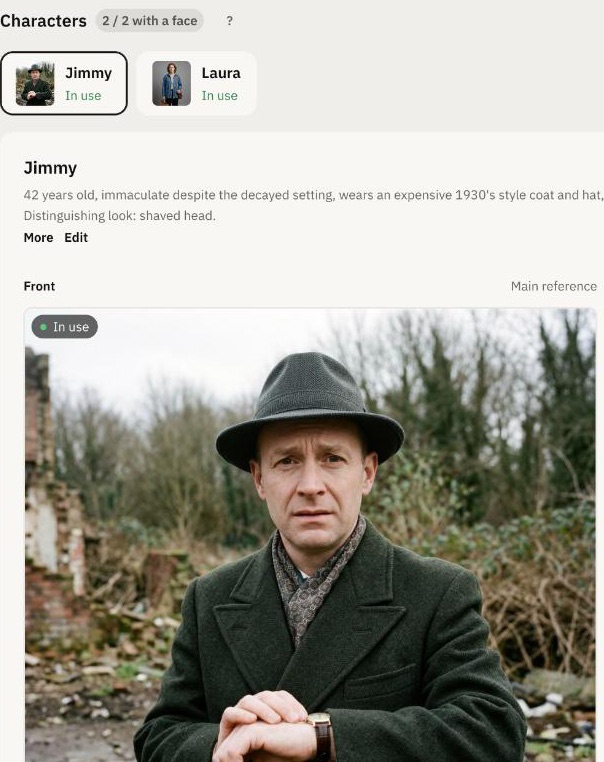
The cast page: Jimmy's reference portrait and description

Cast

A reference for each face, so it stays the same from shot to shot.

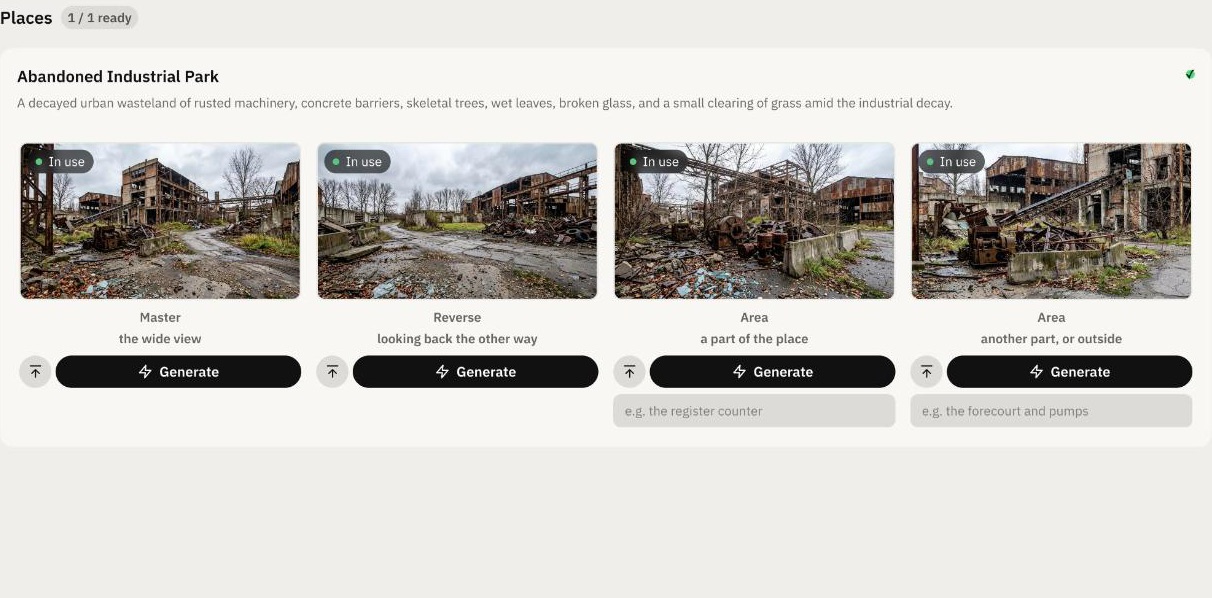
The location page: four views of the abandoned industrial park, the master, the reverse and two areas

Locations

Four views of each place, drawn from the same master.

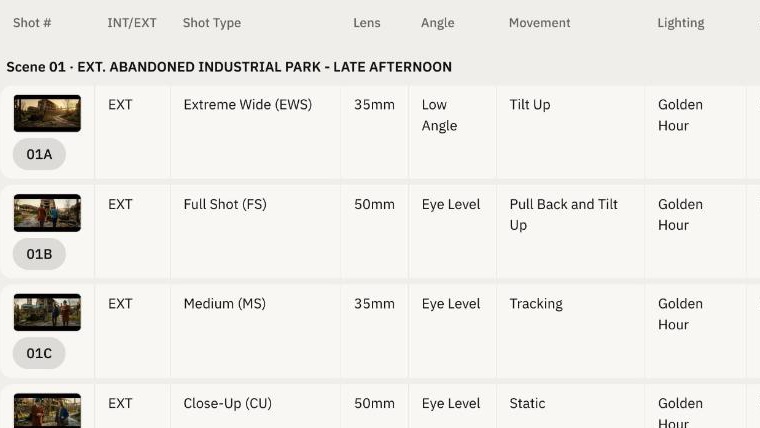
The shot list: shot type, lens, angle, movement, lighting and mood for each shot

Shot list

Size, lens, angle, movement and lighting for every shot.

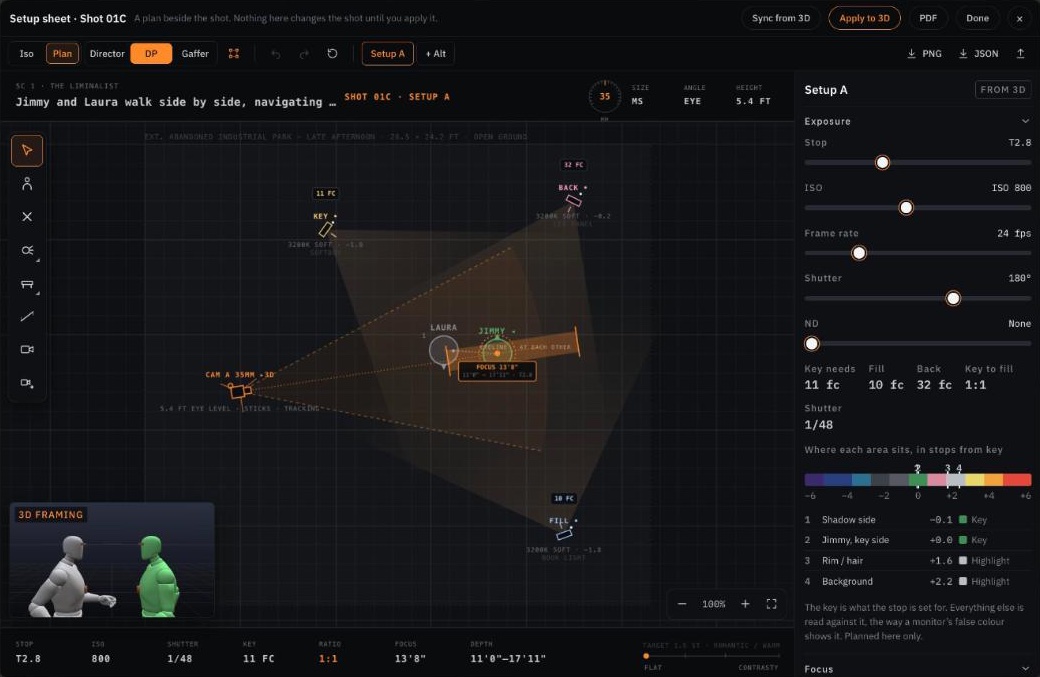
The setup sheet for shot 01C: an overhead plan of the camera, the two actors and the key, fill and back lights, with the exposure beside it

Camera setups

A plan for each setup: camera, cast, lights and exposure.

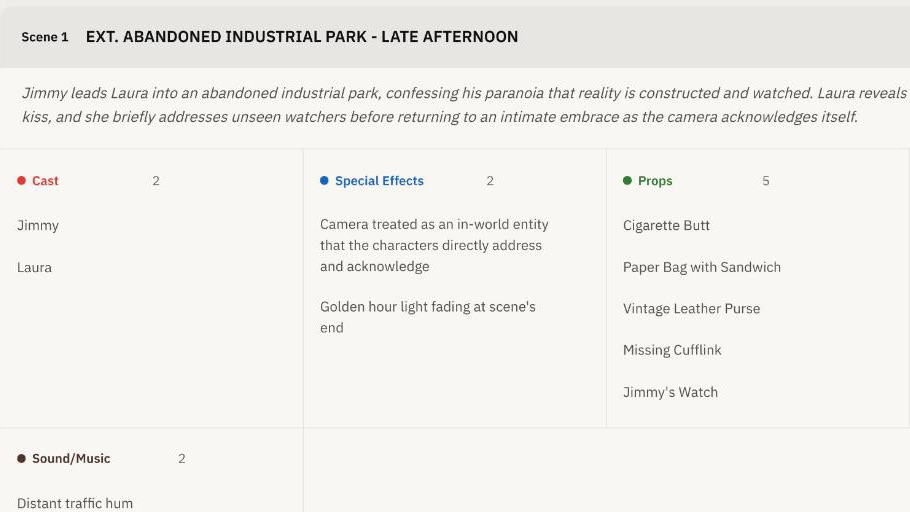
The scene breakdown: cast, effects, props, wardrobe and sound for the scene

Breakdown

Cast, props, wardrobe and effects, scene by scene.

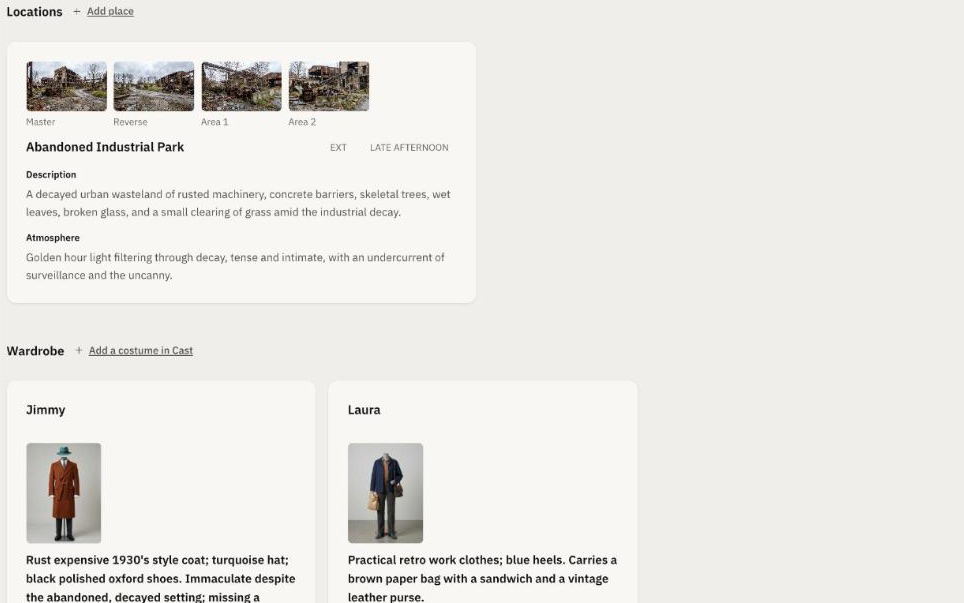
Logistics: the location with its four views, and each character's costume with a picture

Logistics

Every location, costume and prop, in one list.

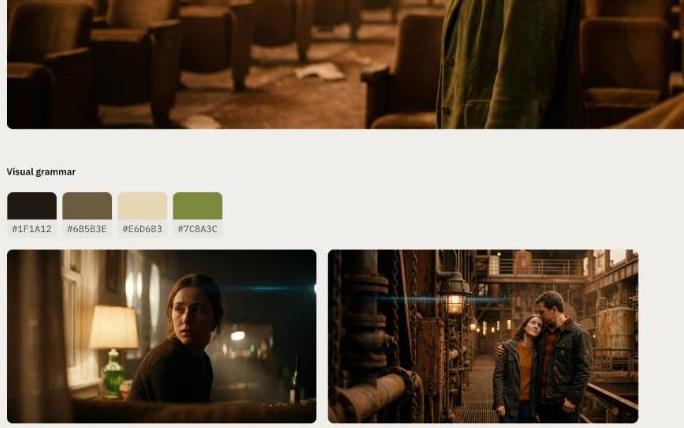
The moodboard: the film's colour palette and two reference frames

Moodboard

References for the tone and the look, with the film's palette.

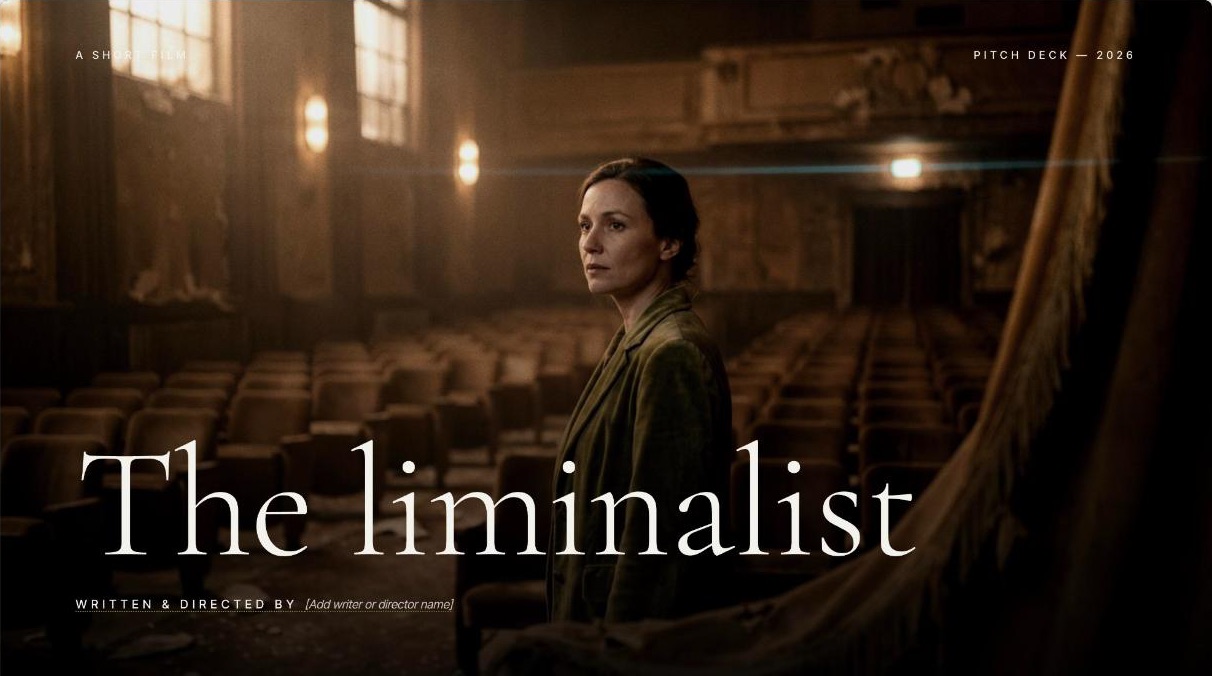
The cover slide of the pitch deck for The liminalist

Pitch deck

About twenty slides in ten designs. Every line is yours to edit.

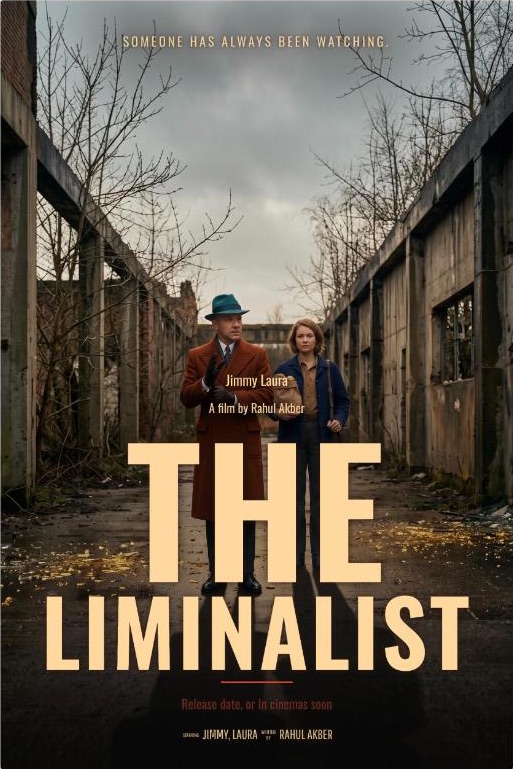
The poster for The liminalist, with its title and credits set as type

Poster

Key art, with the title and credits as type you edit.

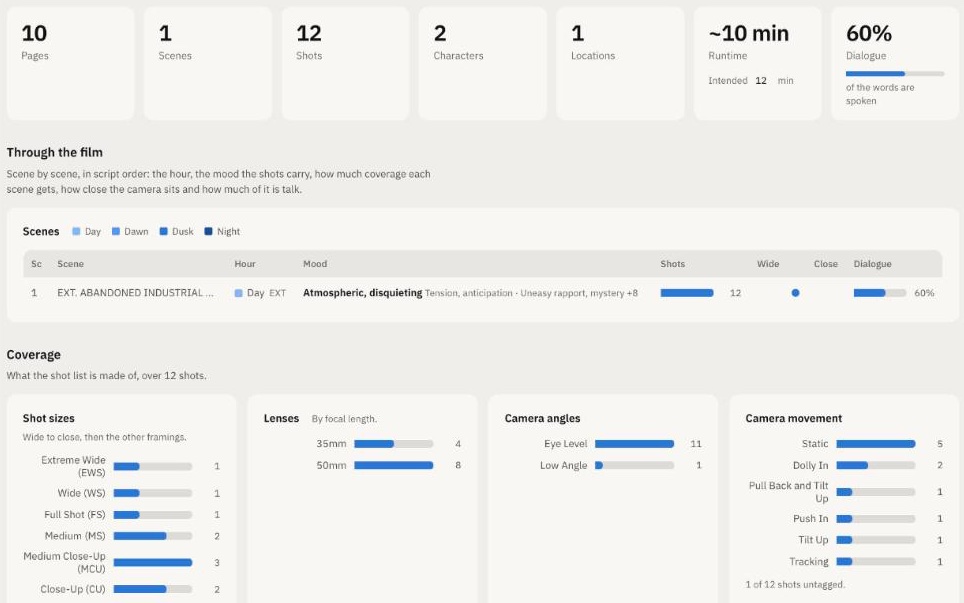
Analytics: pages, scenes, shots, runtime and dialogue, then the coverage by shot size, lens, angle and movement

Analytics

Pages, runtime, coverage and dialogue, scene by scene.

And the script itself, read in any of 15 languages.

No subscription. Pay for what you generate.

Credits never expire, and every button shows its cost first. Planning by hand and framing in 3D cost nothing.

Your balance
Running low
—credits
  • Checking your balance…
  •  
  • Works across every project
  • Never expires
  • Every pack adds to it
Free
$0
  • 50 credits on signup
  • No card required
Starter
$6
  • 350 credits
  • 43–50 storyboard panels
Pro
$15
  • 1,000 credits
  • 125–142 storyboard panels
Studio
$29
  • 2,100 credits
  • 262–300 storyboard panels

Every pack: all 13 tools, cloud save and PDF export. Checkout by Stripe; unspent pack credits are refundable within 7 days.

How it works

1

Add your script

PDF, Word, Fountain or plain text, up to 35 pages at a time.

2

Set it up

Faces for your cast, photos of your places, a look.

3

Frame and generate

Check each shot in 3D, then draw the frames you want. Fix one without redoing the rest.

About

We're not a big company. We make SPACEODD because we love films, and the craft of making them, and that's why we're careful with AI. Every use of generative AI in here was argued over before it went in. A lot of SPACEODD is plain computation, like the 3D framing, the camera setups and the analytics, and pictures are made only when you ask for them. We don't want this to become another machine for AI slop. We want it to take the slow parts of pre-production off your hands, so you have more time for the ideas, the choices and the craft. If it gets you excited to go and make the thing, even better.

SPACEODD is made by Rahul Akber, a designer and filmmaker. www.rahulakber.com

Investors and studios: invest@spaceodd.com

Questions

Who owns what I make?

You do. In the US, images made entirely by AI can't be registered for copyright.

Do credits expire?

No. A failed generation gives its credits back.

Can I get a refund?

On unspent pack credits, within 7 days.

What if I delete my account?

Your projects are deleted within 30 days; only minimal sign-in records are kept, for fraud prevention.

Is my script used to train AI?

No. It goes to our AI providers (mostly Anthropic and Google) only to process your request.

Can I use photos of real people?

Only with their consent, and never for sexual or defamatory images.

Contact

Questions, bugs or ideas. We read every message.

Or email alindib@gmail.com.

FROM SCRIPT TO SET / 001

SCREENPLAY IN.
STORYBOARD OUT.

All-in-one pre-production workflow, no subscription required.

  • 3D framing
  • Cast & locations
  • Pitch deck
  • Moodboard
  • Poster
  • Shot list
  • Script breakdown
  • Analytics

50 free credits · No card required

Watch the film
01 / THE SCREENPLAY

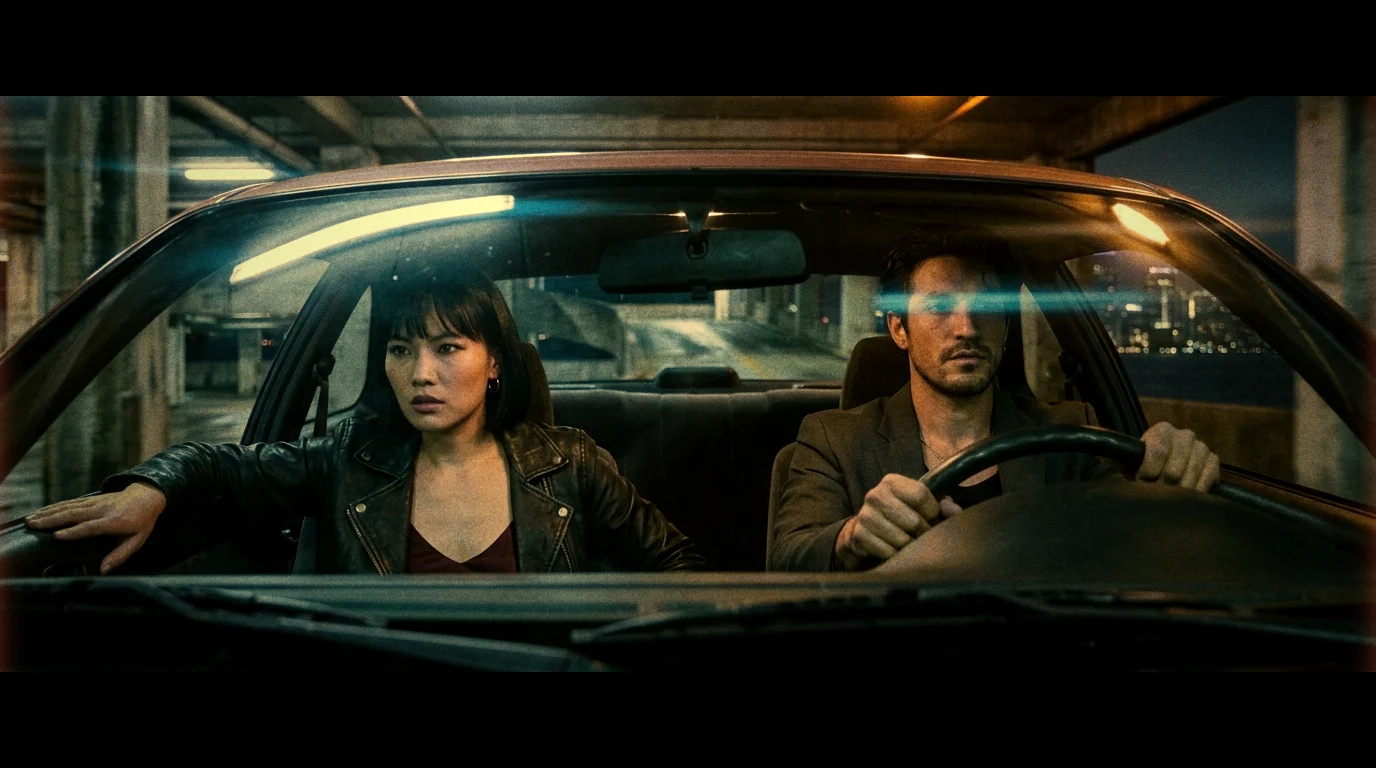
INT. COUPE – UNDERPASS – NIGHT

Amber light streaks across the windshield.

MATEO grips the wheel. MAYA braces one hand against the door.

MAYA
Do we go in?

MATEO
Not yet.

02 / YOUR FRAMING3D
Two characters blocked inside a car in SPACEODD’s 3D editor
03 / YOUR STORYBOARDCINEMATIC
Cinematic storyboard: Maya and Mateo in a car beneath amber lights
INT. COUPE / NIGHTYOUR VISION, IN FRAME. ↗
A scene from the reel. An example of what you can build.
YOUR STORY. YOUR VISION. YOUR FINAL SAY.SEE HOW IT COMES TOGETHER

YOUR FIRST STORYBOARD / A QUICK WALKTHROUGH

FROM SCRIPT
TO FIRST FRAME.

New to SPACEODD? Create your free account, then follow these three steps. Start with one short scene.

EXPLORE THE EXAMPLE
Same scene. From words to a frame.

THE UNDERPASS SCENE
1.

INT. COUPE – UNDERPASS – NIGHT

Amber light streaks across the windshield.
Concrete pillars recede into the night.

MATEO grips the wheel, eyes fixed ahead.
MAYA braces one hand against the door.

Neither looks at the other.

MAYA
Do we go in?

MATEO
Not yet.

A fluorescent strip flickers across the glass. Maya watches the empty road beyond it.

MAYA
How much longer?

Mateo tightens his grip on the wheel. Outside, a distant car passes through the intersection and disappears.

MATEO
Until the light goes out.

Maya turns toward him. He keeps his eyes on the concrete ramp ahead.

The engine hum fills the silence. Above them, one fluorescent tube blinks, then steadies.

MAYA
And if it doesn't?

Mateo checks the rear-view mirror. Empty road. He lets the coupe roll forward a few inches.

Another amber band crosses their faces as they move out from beneath the overpass.

MATEO
Then we make our own way in.

Maya takes her hand from the door. This time she looks through the windshield, toward the road ahead.
Your screenplay is the starting point. The direction is yours.01 / 03

STEP 1 / ADD YOUR STORY

Start with a scene you want to see.

Paste your screenplay or upload a PDF, DOCX, TXT, or Fountain file. A short scene is a simple way to try your first storyboard.

You’ll start with: the words, characters, and action for your scene.

BUILT AROUND YOUR DIRECTIONCharacter DNA8 visual stylesEditable shotsPDF exports

THE STORYBOARD IS THE START

ONE SCRIPT.
THE WHOLE KIT.

The same read that builds your storyboard fills the rest of pre-production. Every module works from your screenplay, in the same project.

  • 3D framingOrbit the camera, pose your cast, swap lenses, then render the frame as you blocked it.
  • Cast and locationsReference images for every character and place, so faces and sets hold from shot to shot.
  • Pitch deckA structured deck ready for producers, festivals, or investors.
  • MoodboardVisual tone references from your script’s mood and chosen style.
  • PosterKey art from your project’s tone, title, and visual style.
  • Shot listEvery shot tagged with lens, type, and INT/EXT. Editable and downloadable.
  • Script breakdownScene breakdowns with cast, props, wardrobe, SFX, and production notes.
  • Analytics and logisticsPage counts, dialogue ratios, location frequency, wardrobe details, and a master props list.
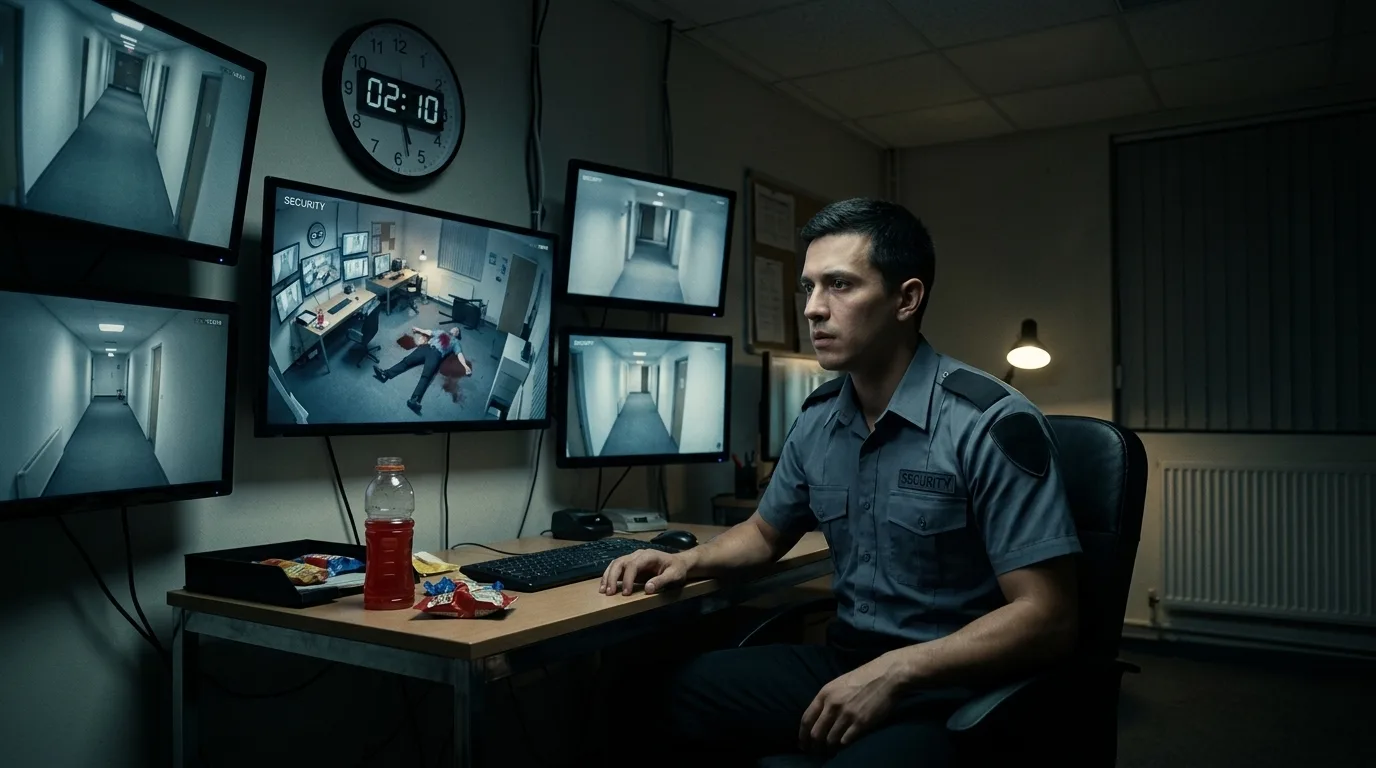
A cinematic Nightshift storyboard frame of a security guard surrounded by monitors

YOUR STORY COULD BE NEXT

GIVE YOUR FILM
ITS FIRST FRAME.

Bring one scene. Start making it visible.

NIGHTSHIFT / EXAMPLE STORYBOARD
START FREENO CARD REQUIRED
50 FREE
CREDITS

Try the workflow with your own screenplay. Your first visual plan starts here.

✓ Your story. Your direction.✓ No subscription.✓ Buy more credits when you need them.
See current credit pricing

BEFORE YOU CALL ACTION

A FEW
QUICK ANSWERS.

What do I need to get started?

A screenplay of up to 35 pages. Paste it in, or upload a PDF, DOCX, TXT, or Fountain file. Start with a short scene if you want to explore the workflow first.

Is it free to try?

Yes. New accounts get 50 free credits with no payment card required. Generation costs vary, and the app shows the cost before you generate. You can buy more credits when you need them.

Can I change the shots?

Yes. Adjust the blocking, camera angle, and lens in 3D, then generate the storyboard image. Refine individual frames and edit your shot list as your direction evolves.

Can I share the results with my crew?

You can export your storyboard and other materials to PDF. Use them to communicate the framing, look, and direction of your film.

YOU HAVE THE STORY. TAKE THE NEXT STEP.

STOP WAITING.
START FILMING.

50 free credits. No card required.